
Google Ads channel prioritization: what it changes before BFCM 2026


Google announced channel prioritization and budget allocation on October 14, 2026, and its help center lists October 15 as the first day the controls start reaching accounts. That puts a new budget control in front of ecommerce teams about six weeks before Black Friday (November 27) and Cyber Monday (November 30).
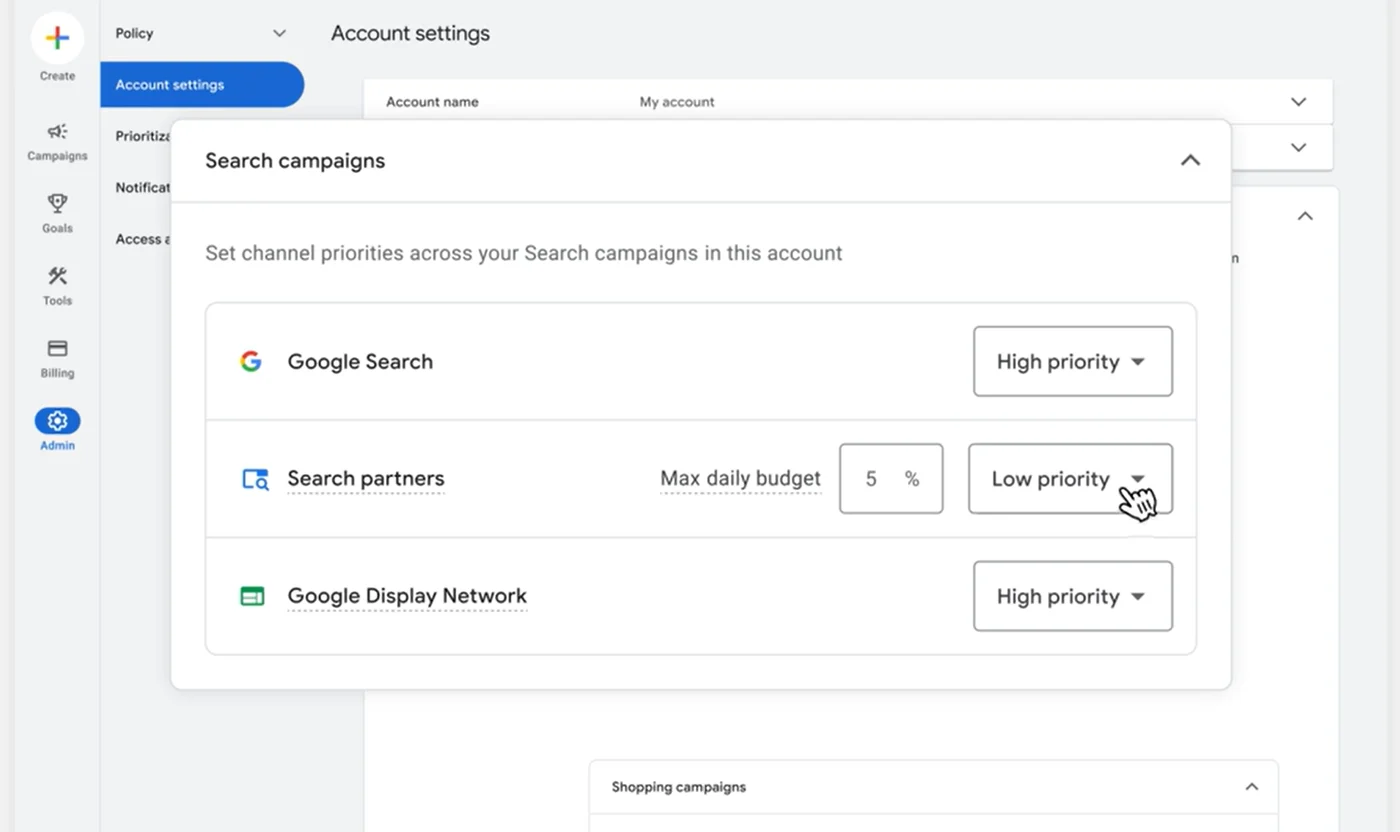
The feature does two things. It lets you rank the channels inside a campaign as High or Low priority, and it lets you put a daily percentage cap on the Low priority ones. For a lot of ecommerce accounts the cap is the piece that changes spend during peak season, because priority on its own only kicks in when a campaign runs short of budget.
Below is what Google has documented, what it hasn't, and how we'd handle it with Q4 budgets on the line. We've labeled our own recommendations as ours.
What Google shipped
Channel prioritization sorts a campaign's inventory into two tiers:
- High priority: Google funds these channels first (within your target if you bid on Target CPA or Target ROAS). Every channel starts here by default.
- Low priority: Google spends here after the High priority channels. Google positions it as an option for channels you value less, so you don't have to opt out of them completely.
Budget allocation is the second control, and it only works on Low priority channels. You enter an optional percentage, and Google aims to keep that channel's daily spend at or under that share of the campaign's average daily budget. Google's own example: a 5% allocation on a $1,000 average daily budget means it aims to keep that channel at or below $50 a day. Set a Low priority channel to 0% and Google won't spend on it at all.
Three details in the documentation matter more than they look:
- It's a best-effort limit. Google says daily spend on the channel "may occasionally exceed" the allocation, including on days when the campaign spends more than its average daily budget.
- The math runs off the average daily budget, not off what the campaign actually spent that day.
- It resets every day. Unspent or overspent amounts don't carry over.
You can set all of this at the account level as a default for every campaign of that type, on a shared budget, or on a single campaign. Campaign and shared budget settings override the account default.
Which channels you can rank, by campaign type
| Campaign type | Channels you can prioritize | Budget allocation on Low priority? |
|---|---|---|
| Search | Google Search, search partners, Google Display Network | Yes |
| Shopping | Google Search, Google search partners | Yes |
| Performance Max | Google channels (grouped), Google search partners, Google Display Network | Yes |
| Demand Gen | Google channels (grouped), Google Display Network | No |
Source: Google Ads Help, "About channel prioritization and budget allocation."
It's rolling out, so don't expect it everywhere yet
Google describes a progressive rollout across Search, Shopping, Performance Max and Demand Gen "over the coming months," and says availability can vary by campaign type and timing. If the card shows up in one of your accounts this week and not another, that's expected.
A few more limits from the help center:
- You can't set it from a manager account. It has to be set in each client account or on the campaign.
- Google lists Google Ads and Search Ads 360 as the places to manage it today, with Google Ads API and Google Ads Editor support "coming soon."
- Campaign total budgets work with channel prioritization on Demand Gen only. On the other campaign types, a campaign running a total budget won't apply the settings.
- Shared budgets need every campaign in the pool to be the same type (all Search or all Shopping, for example). When the settings apply, the shared budget is treated as one pool.
- Custom experiments support it, but multi-campaign shared budgets aren't supported in experiments, and all channels there get treated as the same tier.
If your BFCM plan assumes you'll bulk-edit these settings in Editor, confirm that support has landed before you build the plan around it.
Priority only matters when the budget runs short
Whether priority changes anything depends on your bid strategy and on whether the campaign is limited by budget. Google's help center spells it out:
| Bid strategy | What channel priority does |
|---|---|
| Target CPA, Target ROAS or Target CPC, not limited by budget | Generally nothing. The campaign aims for your target across all channels. Any budget allocation on Low priority channels still applies. |
| Target CPA, Target ROAS or Target CPC, limited by budget | High priority channels spend first, within your target. If more High priority spend would miss the target, budget shifts to Low priority channels when they can convert at your target, still subject to any allocation you set. |
| Maximize conversions, Maximize conversion value, Maximize clicks, Manual CPC, Target impression share | High priority channels spend the budget first. Whatever they can't use (because of settings or eligible traffic) goes to Low priority channels. |
So on a Target ROAS Shopping or Performance Max campaign with room in its budget, moving search partners to Low priority won't change much by itself. Google says as much in its announcement, and it's the reason budget allocation exists: on a target campaign that isn't budget-limited, the percentage cap is the control that actually moves money.
That runs against a familiar Q4 move. If you raise budgets going into Black Friday so campaigns aren't capped on the biggest days, you also shrink what priority can do, because the more headroom a target campaign has, the less its priority settings matter. If you want to steer channel spend on those campaigns during Cyber Week, plan on using the allocation.
This sits on top of another change Google made this year. Since August 17, 2026, Target CPA and Target ROAS campaigns that are limited by budget aim to perform closer to the target you set, where before some of them beat it. Google notes that Performance Max and Demand Gen campaigns may show shifts in how traffic is distributed across channels as a result. If your channel mix moved in late August, review that bidding change alongside your own account changes before attributing the shift to channel prioritization.
Performance Max treats "Google channels" as one bucket
In Performance Max and Demand Gen, Google groups Search, YouTube, Maps, Gmail and Discover together as "Google channels" and prioritizes them as one unit. In Performance Max, search partners and the Google Display Network can each have their own tier. Demand Gen offers a separate tier for the Display Network. That means you can tell PMax to fund Google's own surfaces before Display, but this control won't let you favor Search over YouTube inside PMax. Google's answer for advertisers who want that level of control is Search and Demand Gen campaigns, which let you opt out of each supported channel individually.
Before you change anything in PMax, open the channel performance report (Insights and reports, then Channel performance). It breaks a PMax campaign's results down by channel and by format, including ads using product data, and its status column flags channel-level issues. That tells you how much is going to Display and search partners today, which is the number you need before you pick an allocation percentage.
For Shopping-heavy PMax, feed health still decides a lot of what's eligible to serve in the first place. Our post on product feed management covers which Merchant Center alerts actually block sales, and it's worth a pass before the holiday rush either way.
Demand Gen gets priority but no cap
Demand Gen supports channel prioritization (Google channels and the Display Network) but doesn't support budget allocation. It's also the only campaign type where channel prioritization works with campaign total budgets. In practice you can tell a Demand Gen campaign to use Display last, but you can't put a percentage ceiling on Display. If a spending limit on Display matters for your holiday Demand Gen push, priority alone won't give you one.
Search campaigns and the February 2027 Display deadline
Search campaigns with the Display Network turned on continue to use Display Expansion's spend behavior until February 2027 unless you apply the new channel settings sooner. Starting in February 2027, Google migrates those campaigns to channel prioritization and budget allocation, the current setup goes away, and Google says you may see spend shift between Google Search, search partners and Display.
Google's instruction for keeping today's behavior is to set the Display Network to Low priority with a 50% daily budget allocation (best-effort, like every allocation). Two more notes from the help center: Display will stop serving on Search campaigns that use the Target impression share bid strategy, and if you set channel priorities on a Search campaign before February 2027, the new settings take effect right away and replace Display Expansion's budget behavior on that campaign.
That makes timing a real decision. Touching a Search campaign's priority card in November moves it onto the new system in the middle of peak season. If you're happy with how Display Expansion behaves on a campaign today, our recommendation is to leave it alone until January and make the switch when traffic is calmer.
How we'd approach it before BFCM
Everything in this section is our own recommendation.
- Start with two lists. Pull every campaign that was limited by budget during last year's peak, and every campaign where search partners or Display is getting meaningful spend today. Those are the campaigns where these controls can actually change something.
- Change campaigns before you change defaults. An account default reaches every campaign of that type, and Google warns that a campaign currently spending more than your new percentage on a Low priority channel may see that spend shift once the setting applies. Test on one campaign first.
- Use Low priority plus a small allocation to re-test a channel you turned off. Google calls out this use case directly. If you opted out of search partners years ago, a Low priority slot with a small cap is a more contained way back in than switching it fully on. Do it in early November so it has a few normal weeks before Black Friday.
- Remember the cap moves with your budget. Allocation is a share of the average daily budget, so if you double a campaign's budget for Cyber Week, the intended dollar allocation on the Low priority channel doubles too. If you want to keep the intended dollar allocation steady through peak, recalculate the percentage whenever you change the budget. Actual daily spend can still exceed that amount.
- Lock settings before the peak. Google lists a setting change as one of the reasons a bid strategy can show a "Learning" status, when performance may fluctuate while bids adjust. Google hasn't said whether a channel priority change triggers it, so we'd make channel changes by mid-November and leave them alone from Thanksgiving through Cyber Monday.
Testing and measurement cautions
- Best-effort means you check it. For the first week on any campaign with an allocation, pull channel-level spend daily and compare it with the percentage you set against the average daily budget. Google says spend can run over on some days, so one high day isn't a bug. A steady pattern of overruns is worth raising with your Google rep.
- Big days can legitimately run over. Google lets most campaigns spend up to twice their average daily budget on a given day, and the allocation is still calculated from the average. Google also says allocations may not hold on days when the campaign spends above its average daily budget, so plan your Cyber Week monitoring around that.
- Don't read a channel test across Black Friday. BFCM is the kind of short sales event Google built seasonality adjustments for, when a promotion is expected to cause a substantial change in conversion rates. Smart Bidding already accounts for normal seasonal patterns, so a BFCM sale does not automatically call for an adjustment. A channel change made the week before Black Friday gets mixed up with the holiday itself. Before the peak, compare similar windows and allow for conversion lag, while accounting for promotions and other changes. Where practical, use a custom experiment where your campaign type supports one (Google's custom experiments cover Search, Display, Video and Hotel campaigns, and aren't available for Shopping).
- Keep a change log. Write down the date and the setting every time you change a priority or an allocation. Between the August bidding change, seasonality adjustments and your own holiday budget moves, you'll want to be able to tell later which change caused which shift.
- Judge on revenue and margin. Read results at the campaign level against revenue and margin, alongside the channel breakdown, so a channel that got less budget doesn't get mistaken for a channel that underperformed. If you don't trust your numbers enough to make that call, attribution modeling is the place to start.
Common questions
Is budget allocation a hard spending cap? No. Google calls it best-effort. It aims to keep a Low priority channel at or under the percentage of the average daily budget you set, but daily spend on that channel may occasionally go over.
Does channel prioritization work in Performance Max? Yes, once the rollout reaches your account. Google's own surfaces are grouped as "Google channels," and search partners and the Display Network can each get their own tier and allocation.
Can I manage it in Google Ads Editor or the API? As of October 2026, Google lists Google Ads and Search Ads 360 as supported and says API and Editor support is coming soon.
What happens to Display Expansion on Search campaigns? In February 2027, Search campaigns with Display turned on move to channel prioritization and budget allocation. To keep today's behavior, Google says to set the Display Network to Low priority with a 50% allocation.
What to do with it this Q4
Channel prioritization gives ecommerce teams a middle setting between leaving search partners and Display fully on and turning them off. For this holiday season, the budget allocation percentage is the control most likely to change spend on target campaigns with room in their budgets. Priority matters mostly on campaigns that hit their budget, and any Search campaign with Display turned on deserves a timing decision before you touch it.
If you'd like a second set of eyes on your account before Black Friday, our paid media team can review where your budget is going by channel and what we'd change. Let's talk. For the rest of your planning, our ecommerce holiday marketing guide and paid media guide cover the bigger picture.
Sources
- Google Ads Help, About channel prioritization and budget allocation.
- Google Ads blog, Tal Akabas, Guide your campaign spending with new priority and allocation features (October 14, 2026).
- Google Ads Help, Changes to target based bid strategies.
- Google Ads Help, About the channel performance report for Performance Max.
- Google Ads Help, About overdelivery and your average daily budget.
- Google Ads Help, About seasonality adjustments.
- Google Ads Help, About bid strategy statuses.
- Google Ads Help, Set up a custom experiment.