
Sending GTINs from BigCommerce to Google Merchant Center for Product Ratings


GTINs (Global Trade Item Numbers) are essential for product visibility in Google Merchant Center and BigCommerce. They help Google match listings to reviews and ratings, improving credibility and click-through rates in search.
A great way to improve the rankings of your Google Shopping ads is to ensure there are product reviews tied to them. There are a variety of ways to accomplish this, but one of the easiest is to ensure that your products in Google Merchant Center have GTINs (Global Trade Item Numbers) set up. If you’ve got GTINs set up on your products in BigCommerce as well, you’re halfway to having product ratings ready to go on your ads.
The tricky part is actually getting the order information (with GTINs) from BigCommerce to flow to Google Merchant Center so that they can be matched to products and have associated ratings tied to them. BigCommerce does have a Google Customer Reviews integration available out of the box, but it doesn’t support GTIN matching.
So how do you overcome this challenge? There’s a couple of steps.
Step 1: Turn off the BigCommerce Google Customer Reviews Integration
This might seem counterintuitive, but you actually have to turn this off, because in the next step we’re going to write a script to manually handle customer reviews and send GTINs. If you don’t turn off the built in integration, we’ll end up with duplicate scripts on the page, which will cause things to not work correctly.
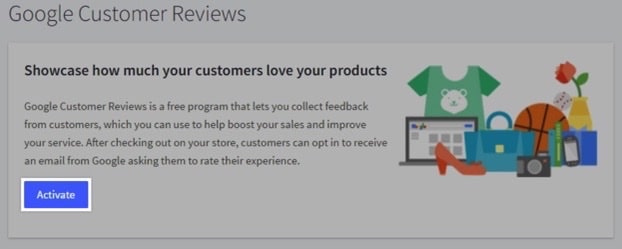
To turn off the integration if you have it enabled, navigate to Marketing > Google Customer Reviews in BigCommerce, and ensure that it’s turned off (the button should say “Activate”:
Step 2: Add a Script to Handle Customer Reviews and Sending GTINs
After ensuring that Google Customer Reviews is turned off in BigCommerce, navigate to Storefront > Script Manager, and create a new script with a location of footer, on your order confirmation page, with a script category of analytics:
You may have to tweak this script a bit, depending on how your GTINs are set up in BigCommerce with your product data, but at a high level we’re using BigCommerce APIs to grab the items from the order, and looping through each one to push the GTIN from the item into an array, that gets sent to Google Merchant Center when the customer review modal is submitted.
Step 3: Verify Product Reviews are Coming Through
That should be it! Once those steps are completed, you’ll be ready to receive product reviews. After a few days of implementing the script (it took almost a week in our case), you should see GTINs coming through and being matched if everything is set up correctly:
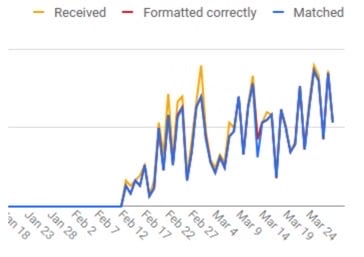
Be patient here, as the dashboard that Google Merchant Center provides for this is several days behind the current date as well.
I think maybe a lot of people imagine an agency is going to dictate how the engagement is going to go, what they’re going to do, and what they’re going to deliver. The thing I like about LimeLight is it’s collaborative. There’s a discussion about what opportunities we can take advantage of and what maybe isn’t the best fit right now. And to me that’s a big value.
Randy Estabrook, Executive Director, AWI-QCP
One Final Tip
There’s a box of information in the product reviews section of Google Merchant Center that can be slightly misleading. Before you’re receiving GTINs, it’s going to say something like this:

This makes it seem like there’s some other step you need to take besides hooking up the GTINs for things to start working. However, once you start receiving GTINs, after a few weeks, you’ll have enough data and this box will change to the following:

People also asked:
What are GTINs and why do they matter in Google Merchant Center?GTINs (Global Trade Item Numbers) uniquely identify products. They help Google match your listings to its product catalog, improving visibility and eligibility for product reviews and shopping ads.
Do all BigCommerce products need GTINs?Not necessarily, but including GTINs whenever possible helps your items show in more searches and improves ad performance through verified product data.
How do GTINs affect product ratings and reviews in Google Merchant Center?GTINs allow Google to associate your listings with existing product reviews and ratings across the web, boosting trust and click-through rates.
Where can I find or create GTINs for my products?Check manufacturer packaging, GS1 databases, or generate your own through GS1 if you produce unique branded products.
How does Limelight Marketing help with GTIN optimization?Limelight audits BigCommerce product data, ensures GTIN compliance, and connects feeds to Google Merchant Center to increase product visibility and conversions.